Why I fix the site before paying for SEO
Four findings that explained why forty-four posts brought no traffic, and a fifth where the tool had the right number and the wrong conclusion.

The traffic arrives, the report looks good, and nothing happens. What to fix before hiring an SEO agency, and why the order matters.
The most common way to waste an SEO budget is for it to work.
The traffic arrives, the numbers in the report go up, and nothing happens. No more enquiries, no more orders, no difference in the bank. The report is not lying. It is measuring one thing that happens to sit in front of the thing you actually wanted.
I do not sell SEO. I design interfaces and I build sites, and that is exactly why I have a fixed opinion about what should be finished before anyone signs an SEO contract. When I take over a site where someone is disappointed with their SEO, the disappointment is almost never about SEO.
The shop by the motorway exit
The comparison I keep coming back to is a shop. You can pay for signs at every exit and get as many people as you like through the door. But if the shelves are unsorted, the music is too loud and the staff cannot say what you sell, they walk straight back out.
The difference from a real shop is that the signs cost money every month regardless of how many people reach the till.
The numbers exist. Baymard Institute has compiled fifty studies on cart abandonment and lands on an average of 70.22 percent. Among the reasons buyers give themselves, 17 percent say the checkout was too complicated and 17 percent say the site had errors or crashed. None of that is solved by more people coming through the door.
What SEO can do, and what it cannot
SEO is good at exactly one thing, and that thing is worth paying for: getting the right people to a page they would not otherwise have found.
That is also all it does. It does not make the page understandable once they arrive, it does not shorten the path to contacting you, and it does not rescue copy that fails to answer the question the visitor actually had.
Google says roughly the same thing from the other direction. The whole point of the guidance on helpful content is that content written for search engines rather than for people is a problem, not a strategy. So this is not a trade-off between SEO and usability. One rests on the other.
What I did to my own site first
I ran this pass over my own portfolio before writing a word on the subject. Not because the site was broken, but because the class of faults I look for is invisible from the outside. They do not show up in a design, they do not show up in a report, and most of them are only found by going through the site methodically.
I measured it myself instead of trusting the tool
A well known tool flagged that not a single page on my site had a fast server response time. That is the kind of line that quietly becomes an argument in a proposal.
So I measured it. Time to first byte came in at 167 milliseconds. Google counts 0.8 seconds or under as good and over 1.8 seconds as poor, so the site sits well inside the green. The tool was measuring from its own server on the other side of the Atlantic. The number was correct and the conclusion was wrong.
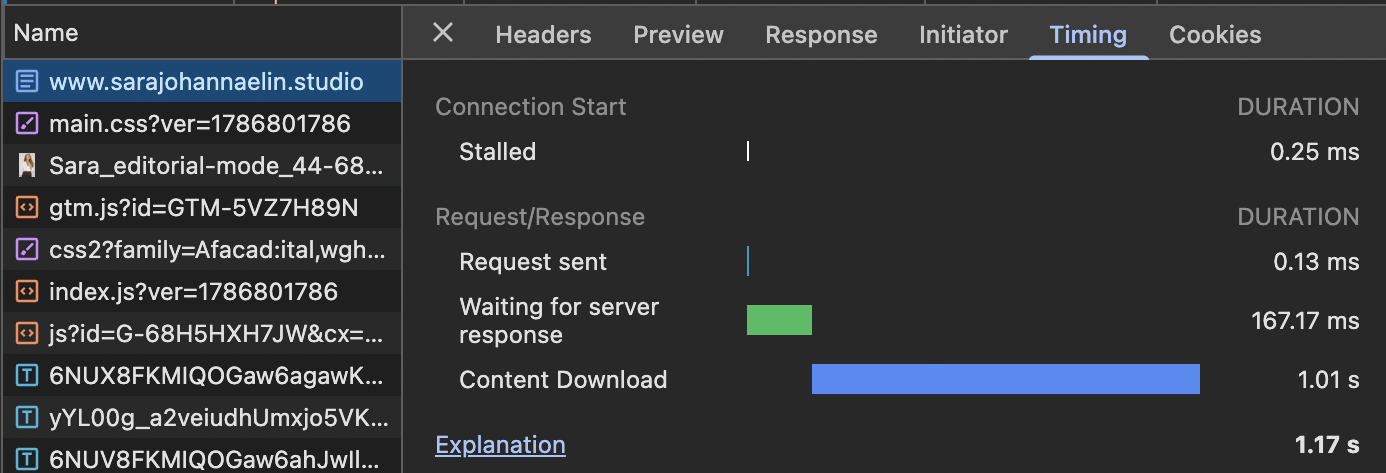
The same page, measured from Stockholm rather than from a server in the US.
One more thing belongs to the same point: measure while logged out. Being logged into the admin bypasses the page cache, and the same page then answered in just over a second. Both numbers are true. Only the logged out one is what a visitor actually meets.
This is the single most useful habit in the whole pass. Re-measure before you believe an alert, and find out where the measurement was taken from. A tool that measures from Virginia is telling you something true about Virginia.
I followed every internal link
The site had changed its URL structure. The redirects worked, so nothing looked broken, but in practice 47 internal links across 38 of 44 posts were taking a detour before arriving.
That never shows up when you click around as a visitor. It shows up when you list every link and check what it answers before the redirect rather than after. All 47 now point straight at the right address.
One detail worth knowing for anyone writing in an editor: single quotes in a link get re-encoded when the post is saved, and the quote mark becomes part of the URL. Always use double quotes. That one alone accounted for a handful of 404s that looked fine in the editor.
I checked what a shared link actually looks like
Paste one of your pages into a chat and look at the preview. If no image appears, the Open Graph tags are missing.
On my site the tag that promises a large sharing card was still in place while the image was missing on everything except the front page. Reserved space for something that never arrived. The site now runs a chain instead of a single rule: the hero image if the page is a case study, otherwise the featured image, otherwise the first image in the body, and finally the logo.
A chain matters more than it sounds. My first version gave up as soon as it hit a dead attachment id, which meant one deleted image silently took the sharing card with it.
I listened to the site instead of looking at it
The media library is shared between Swedish and English. That means the same image carries the same alt text whatever language the page is in, so a screen reader was reading Swedish descriptions aloud on the English pages and the other way round.
Polylang can translate media, but then you get a second attachment per language and every image field points at the wrong one in half of them. I solved it by storing the alt text as its own field per language on the same attachment instead. One attachment, two descriptions, no duplication.
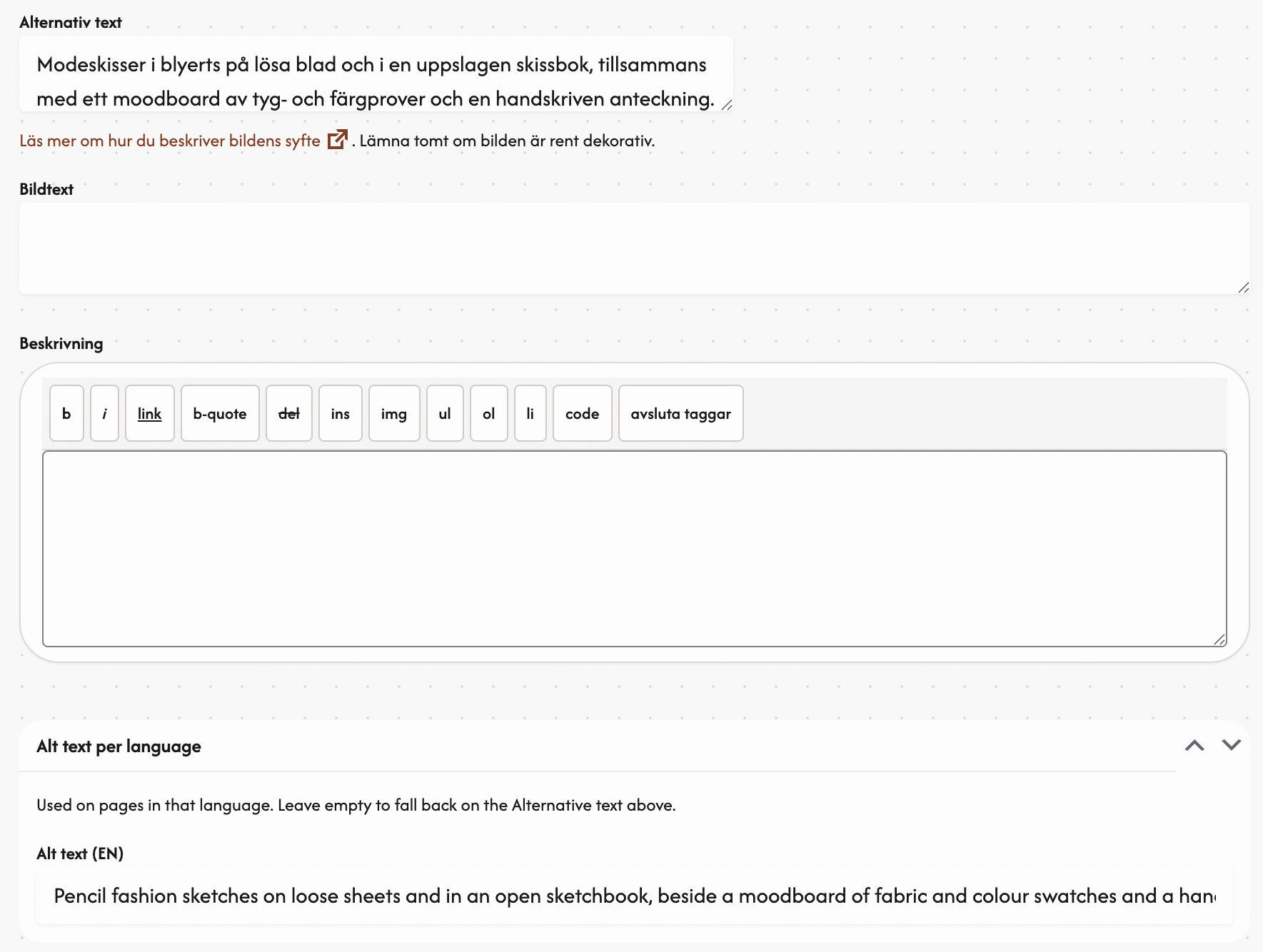
One image, two descriptions. An empty field falls back on the Swedish one.
That is not SEO work. It is accessibility work that happens to have an SEO value, and that is roughly how I see the whole list.
Why the order is what it is
The order is not my invention. It is the same order interaction design has worked in since long before search engines became a marketing channel: understand the task, build the structure, make the surface, measure.
Mattias Arvola’s Interaktionsdesign och UX, second edition from 2020, walks through that chain including the chapters on usability measurement and the business perspective. Those are precisely the parts that get skipped when someone wants traffic quickly.
The point is simple. Each step makes the next one worth more. Do them in reverse and you are paying for visitors who meet a site that was not ready for them, which means you have not bought growth, you have bought a monthly cost.
Speed is not a detail in this. The study Google commissioned from 55 and Deloitte, Milliseconds Make Millions, followed 37 brand sites and more than 30 million sessions. A 0.1 second improvement in load time produced an 8.4 percent lift in retail conversion, and a 9.2 percent lift in consumer spend. A tenth of a second.
When hiring an SEO agency is the right move
When the site works, when you know what a conversion is and can measure it, and when the content answers real questions. Then SEO is exactly what it should be: a channel that brings the right people to something worth arriving at.
Before that, it is signage at the exit to a shop that has not opened yet.
The next post is the list itself, the checklist I work through on every site, in the order I actually work. If you want to see what else I do on a project it is on what I do, and I write about what happens after the visitor arrives in the post on landing pages that actually convert.
Read next